CSS Grid by
Scoroncocolo
This little Web page is all about creating CSS Grid collages using a combination of CSS and HTML code
You don't have to own a website to make your own CSS Grid creations
But you WILL need a Text Editor like the one I use which is the free-to-try Sublime Text
If you don't want to install a fancy text editor on a PC you can create webpages with Notepad or on a Mac with TextEdit
The best reason you should be interested in playing around with CSS Grid image collages is because it's fun to do
"We are here on Earth to fart around... we are dancing animals" - Kurt Vonnegut
You don't need to be a wizard to make magic with CSS Grid
CSS Grid
This is <div class="hover">
Hover with 12 Image Files
First of all I'd like to thank Geoff Graham of CSS-Tricks for helping me to wrap my head around the magic of CSS Hover Effect
These Hover Effects activate when a user moves the mouse cursor over an image so obviously this isn't going to work well on a phone
How It Works
The HTML
Click HOVER CODE button to your right and you will see that the HTML code to create this Hoover Grid is a simple list of images within a div container
The CSS
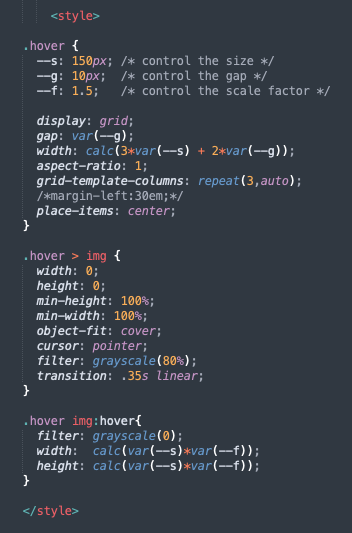
In the CSS portion of the Hover Grid we first define some variables
--s: 150px; controls the size of the images
--g: 10px; controls the gaps between those images
--f: 1.5; controls the scale factor or how large the zoom effect will be
CSS Grid
This is <div class="hover">
Scale Factor changed from 1.5 to 3

This is a picture of a CSS Grid image collage with an interesting border effect that we'll talk about eventually in another post

CSS Grid
This is another picture of a css image grid I want to write about in another post
CSS Grid
This is <div class="hover">
This CSS Grid image is called Four Corners and I'm currently working on a post about this
Here is a link to the code
CSS Grid
This is <div class="hover">
Thanks for the visit